Jan 9, 2026
[AI Blog Series Part 3] A Summary of How to Connect Detection → Notification → Improvement. Use Cases of Edge × Cloud Video AI
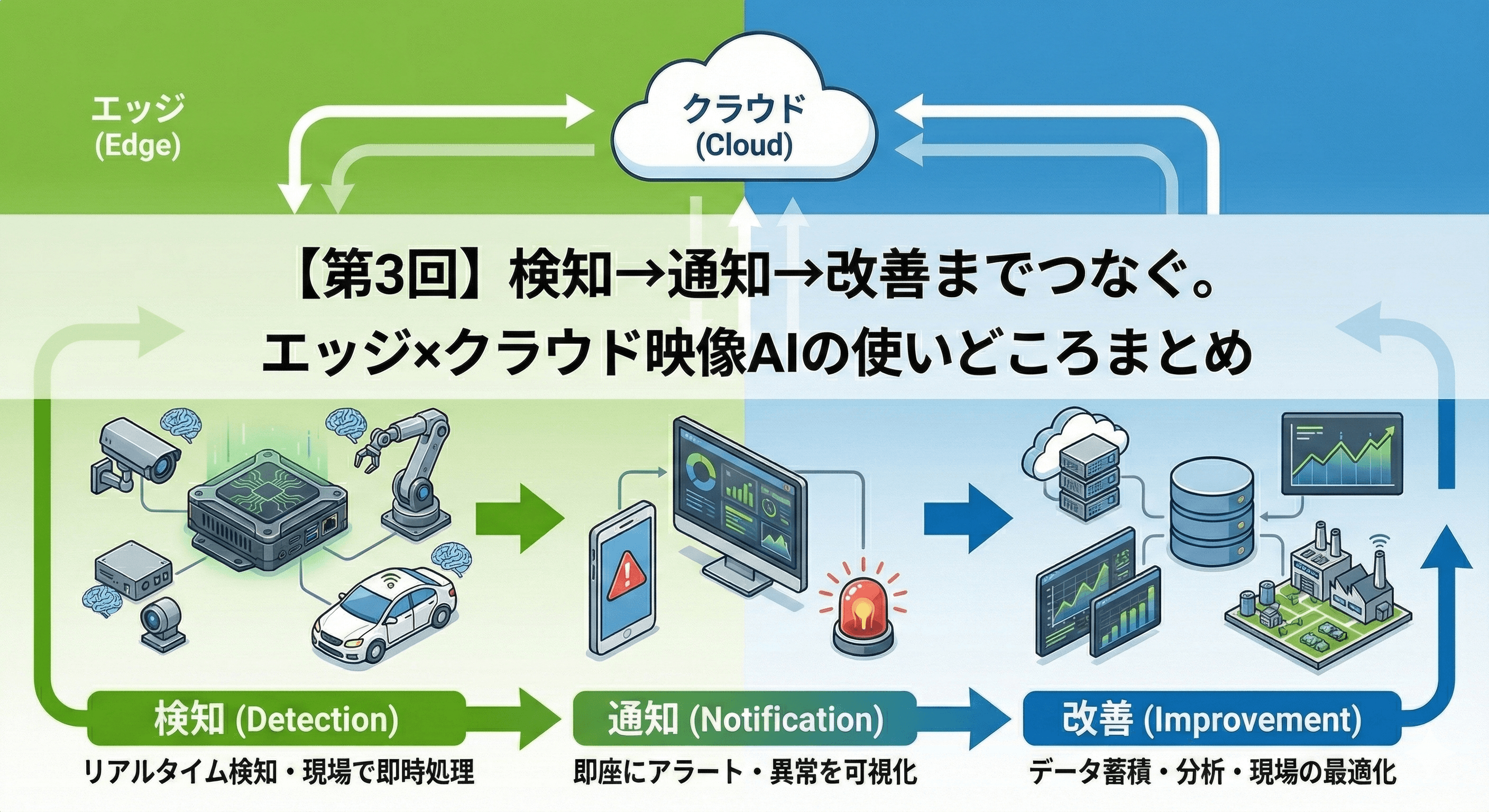
In Part 2, we organized the differences between general-purpose PCs (PCs with RTX) and edge AI terminals optimized for on-site use (Jetson-equipped terminals). In this article (Part 3), I will summarize "how to distinguish between them in practice and how to operate them to achieve results". To conclude, by appropriately combining edge/on-premises/cloud according to on-site requirements, it becomes easier to connect detection to "recording" and to connect recording to "improvement".
Table of Contents
Scenes Where Video AI is Used On-Site (Typical Use Cases)
What Zenmov Can Provide (Requirement Definition → Implementation → Operation → Improvement)
Conclusion: Rotating 'Detection → Recording → Improvement'
1. Scenes Where Video AI is Used On-Site
Video AI is used to reduce the work of "continuously watching with human eyes" and to quickly identify anomalies or signs. Specifically, it is advancing the utilization in places and scenes such as the following:
(1) Factories / Plants / Warehouses (Safety and Operational Optimization)
Detects dangerous area intrusions, falls, crouching, and non-wearing of PPE, supporting safety measures.
Grasps congestion and abnormal signs around equipment to prevent production stoppages and increased response workload.
Visualizes operational conditions and utilizes them to maintain uninterrupted operations (improving operational efficiency).
(2) Parking Lots / Multi-Story Parking Lots / Bicycle Parking (Visualization of Capacity and Congestion)
Automatically grasps capacity, congestion, and stay duration, reflecting this in operational decisions.
Visualizes stay trends and congestion factors, leading to improvements in guidance and arrangements.
Reflects this in signage and web guides, facilitating the distribution of users.
(3) Security / Surveillance / Facility Management (Office Buildings, Commercial Facilities, Schools, Hospitals, Factory Grounds, etc.)
Detects intrusions, suspicious behavior, abandoned items, and lingering individuals, notifying the responsible parties.
Visualizes congestion and queues, facilitating the improvement of security deployment and design of traffic flows.
(4) Logistics Warehouses / Distribution Centers / Yards (Visualization of Safety and Operations)
Detects approaches between forklifts and workers, as well as intrusions into dangerous areas, supporting safety measures.
Grasps congestion in docks and yards, entry and exit, and waiting lines, visualizing bottlenecks.
Improves arrangements, procedures, and rules based on recorded data.
(5) Tourist Attractions / Event Venues / Stations / Airports (Analysis of Human Flow and Congestion)
Visualizes congestion levels, traffic patterns, and stay times, optimizing guidance, direction, and staff placements.
Takes privacy into consideration by aggregating data without identifying individuals (anonymization/statistics).
(6) Disaster Prevention / Infrastructure (Factories, Warehouses, Parking Lots, Roads / Tunnels, etc.)
Early detection of signs like smoke and flames to aid initial responses (communication, evacuation, firefighting).
It is easier to automate detection → notification → recording in areas that are unmanned or at night.
(7) Medical / Nursing Care (Hospitals, Clinics, Nursing Facilities, Waiting Areas / Receptions, etc.)
By grasping signs of falls, departures, and wanderings, it helps reduce the burden of monitoring.
Visualizes congestion and lingering situations, aiding in the improvement of guidance and personnel deployment.
Privacy considerations and the establishment of operational rules are fundamental, such as masking and access rights.
2. What Zenmov Can Provide (Requirement Definition → Implementation → Operation → Improvement)
Zenmov flexibly adapts to any configuration of edge/on-premises/cloud in accordance with the on-site constraints (lines, installation environments, security requirements, etc.) and objectives (immediate notification, recorded storage, cross-site operations, etc.), proposing the optimal combination. We can also propose a configuration where terminals, cameras, detection results, alert history, etc., can be centrally grasped and managed on a dashboard.
Additionally, we are capable of supporting implementations aimed at installations and operations abroad (in regions like Taiwan, the Philippines, Malaysia, the United Arab Emirates, and the United States).
The video AI handled by Zenmov changes the optimal configuration not only based on "what to detect" but also on requirements such as real-time capability, handling of recorded data, and cross-site operations. It can be organized into the following three categories.
① Edge (Detecting on-site and notifying immediately)
The configuration involves analyzing camera footage on the terminal side on-site, and when anomalies or signs are detected, only the necessary results are notified and recorded. As it can be designed not to continuously send footage externally, it reduces delays and communication volume, making it easier to facilitate immediate responses on-site. This method is suitable not only for fixed bases but also for “moving sites” like mobile or portable devices, which can maintain continuous detection and recording operations in unstable communication environments.
Suitable Requirements: Real-time capability is essential / Lines are thin and unstable / Do not want to send footage externally (privacy considerations).
Usage Examples: Safety detection in factories (intrusions, falls, non-wearing of PPE, etc.), capacity and congestion detection in parking lots, intrusion and lingering detection around gates, detection and recording during public transportation or logistics vehicles (event detection during operation, boarding and disembarking detection, etc.).
② On-Premises (Establishing recording, searching, and permission management within the company environment)
This is effective when consolidating recorded footage and events in the company environment and solidifying operations including management of retention periods, viewing permissions, and audit compliance.
Suitable Requirements: Want to complete operations within the company network / Have strict security and audit requirements / Want to prioritize traceability management.
Usage Examples: Monitoring operations for facilities or factory grounds, organizing viewing ranges for stakeholders, reviewing footage post-incident and preventing recurrence.
③ Cloud (Unifying operations and visualizing across multiple sites)
This is effective when consolidating footage and events from multiple sites and advancing situational awareness and uniform operational rules across sites.
Suitable Requirements: Have multiple sites / Want to operate remotely / Want to manage the whole with a single system.
Usage Examples: Integrated monitoring of multiple facilities, remote situational checks, unifying alert response flows.
(Supplement: Positioning of VMS)
Functions associated with recording, searching, permission management, and multi-site operations, commonly referred to as VMS (Video Management System), enable quick searches of "when, where, and what happened" after incidents or troubles, facilitating the sharing among stakeholders and making it easier to standardize operational rules.
3. Conclusion: Rotating 'Detection → Recording → Improvement'
The value of video AI lies not only in finding dangers or anomalies but also in the ability to keep records and connect them to improvements. By combining mechanisms that allow real-time notifications (edge inference) with operational infrastructure such as recording, searching, and permission management, it becomes easier to rotate the cycle of 'detection → recording → improvement'.
Zenmov designs configurations and operations tailored to on-site requirements, providing support from PoC through to implementation, operation, and improvements. We hope to collaboratively explore successful outcomes in various fields, including factories, logistics, facility management, tourism, disaster prevention, and medical/nursing care.
Proven Model (One Example)
■ AI Detection Models / Detection Targets
Boarding and Alighting Detection | People getting on and off vehicles |
Human Posture Recognition | Postures such as standing, sitting, or lying down |
Face Recognition | The presence of a face and whether it belongs to the person |
Electronic Fence Detection | Intrusions or exits of people or vehicles into designated areas |
Crowd Detection (Number Countable) | Determining congestion and how many people are gathered |
Human Lingering (Duration Adjustable) | When a person remains in the same place for a long time |
Human Falls | A person in a fallen state |
Following/Trailing Detection (following someone at the entrance) | The act of intruding behind someone without authentication |
Location Detection and Recording | Arriving at or passing through a specific location |
Clothing Detection (Detection of Work Clothes/Uniforms, etc.) | Whether workers or users are wearing specified clothing (uniforms/safety clothing) |
Vehicle Malfunction | Vehicles that are stopped and not moving, indicating a malfunction |
Sudden Acceleration | Sudden acceleration movements of a vehicle |
Going in the Wrong Direction | Movements of vehicles traveling in the opposite direction to the intended flow |
Running a Red Light | Vehicles entering or passing through an intersection when the light is red |
Climbing a Fence | The act of a person climbing over a wall or fence |
Speeding / Speed Measurement (Including Section Measurement) | When a vehicle's speed exceeds the limit |
Vehicle Registration Recognition | Reading vehicle license plates |
Road Traffic Incidents | Incidents such as collisions or contacts |
Crossing the Center Line (Overlapping Double Lines) | Movements of vehicles crossing the regulatory line at the center of the lane |
Illegal U-Turns | Making U-turns in prohibited areas |
Motorcycle Entry into Prohibited Lanes | Motorcycles entering or traveling in designated prohibited lanes |
Parallel Parking | Vehicles parked side by side |
U-Turn Detection | Vehicles making a U-turn |
Intrusion into Restricted Areas | The act of people or vehicles entering designated restricted areas |
Object Intrusion onto the Road | Objects (obstacles) entering the roadway |
Tracking Vehicle Movement Traces | Tracking and recording the movement route of vehicles |
Illegal Parking (Red Lines, Yellow Lines, etc.) | Vehicles parked in no-parking zones |
Parking at Intersections | Vehicles parked within intersections |
Illegal Left Turns/Right Turns | Prohibited acts of turning left or right |
Heat Detection Sensor Detection | Detecting heat (infrared) from people or objects to ascertain presence |
■ AI Functions and Retail Analysis Pack / Function Descriptions
Event Search | Fast search of recorded footage based on conditions (objects, actions, time, etc.). |
Multi-Camera Face Search | Cross searching the same person across multiple camera footage. |
Mask Detection | Determining the presence or absence of a mask from face images. |
Multi-Camera Number Recognition Search | Recognizing and searching license plates via multiple cameras. |
Tag & Track (PTZ Tracking) | Tagging the target and automatically tracking with a PTZ camera. |
AI Detection of Humans and Vehicles | AI identifies humans and vehicles for alerts and statistics. |
AI Fire and Smoke Detection | AI detects fires and smoke early. |
Person Counting | Automated measurement of visitor numbers and congestion levels. |
Heat Maps | Visualizing lingering and movement lines in color coding. |
Queue Detection | Detecting waiting lines and lingering situations. |
■ PPE (Personal Protective Equipment) Detection Functions
Helmet | Detecting whether safety helmets are worn. |
High-Visibility Vest | Detecting visibility clothing such as fluorescent vests. |
Protective Clothing | Detecting designated work clothes and protective gear. |
■ Human Behavior Analysis
Fall Detection | Detecting when a person is in a fallen state. |
Hand Raising Detection | Detecting the pose of raising both hands. |
Crouching Motion Detection | Detecting a crouched posture. |
Social Distancing Violation Detection | Measuring the distance between people and detecting when it's below a certain distance. |
■ Others
Access Control System Integration | Integration of door unlocking and entry/exit management with video. |
Fire Alarm System Integration | Triggering events in conjunction with fire alarms and alert systems. |
Perimeter Intrusion Detection System Integration | Integration with perimeter sensors to detect intrusions. |
External Event Integration | Integrating information from external devices like POS with video. |
Face Recognition (Watch List) | Identifying registered individuals or persons of interest. |
Number Recognition (Watch List) | Recognizing registered or vehicles of interest. |
Custom AI Analysis | Utilizing user-defined AI models. |
Water Level Detection | Detecting changes in water levels. |
Offline Analysis | Executing analysis and searches on imported video. |
Multi-Camera Object Tracking | Tracking targets across multiple cameras. Detecting waiting lines and lingering situations. |
Similarity Search | Searching for individuals that resemble someone in photos or videos. |
Data Center Domain Integration | Unified management of multiple domains in large-scale environments. |